Siteminder - Configuration
Last modified on:
The Channel Manager provider SiteMinder has intergrated with RezExpert. All bookings made on any of the Siteminder channels i.e. Booking.com Expedia etc will be automatically entered into the RezExpert Availability Grid. Unit Type Inventory is polled between Siteminder and RezExpert. SiteMinder will allow you to offer unique booking rates, Min. Stay requirements etc that are different to those set up in RezExpert. Contact DigitalRez if you wish to intergrate SiteMinder into your RezExpert system.
General
The General setup allows you to create a profile for your business.
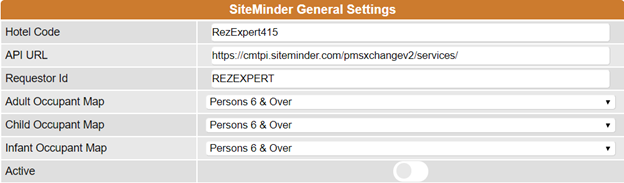
The hotel code is a code provided by SiteMinder which is unique to the business.
The API URL is the link that connects you to SiteMinder.
The Requestor ID is the name of the software that uses SiteMinder.
The Occupant Maps links the occupants between SiteMinder and RezExpert.
Active is the option which allows you to make SiteMinder active.
Codes
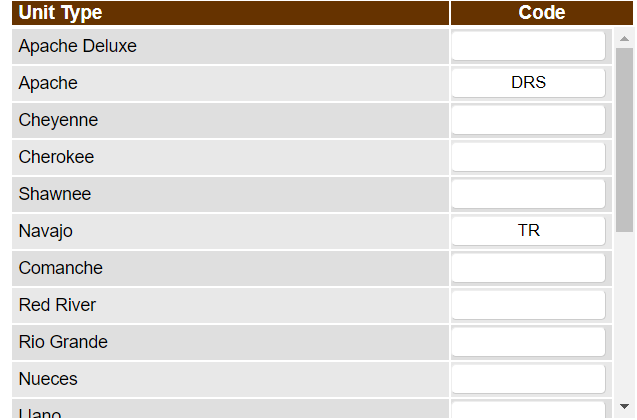
The codes section of the Siteminder setup allows users to assign the Unit Types and Rate Plan codes. Unit Type Codes are entered for the Unit Types that will be available through Siteminder. The Code field should be left blank if that Unit Type should not be available in Siteminder.
Based on the time periods configured, it will allow a Rate Code to be assigned which will then allow the rate plans to become available to be set.
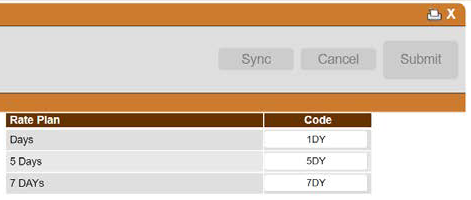
Note: These rate codes would also need to be assigned in Siteminder.
Rate Plans
This panel allows user to configure and manage whether the rates are entered manually for each Rate Plan or automatically synced with RezExpert's rates.
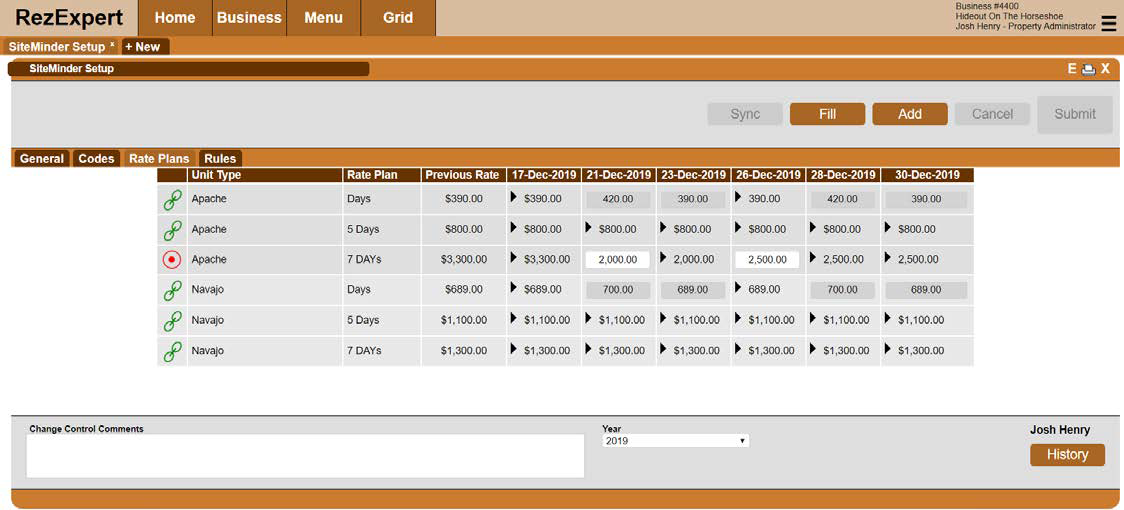
- This icon represents a Rate Plan that IS NOT linked with the Rates Setup in RezExpert.

- This icon represents a Rate Plan that IS linked with the Rates Setup in RezExpert.

When the rate plan is not linked, click on the icon to link to RezExpert's rates. Once clicked, the rate group for which the Rate plan is to be assigned to has to be selected.
To remove the link click on the linked and confirm removal.
Action Buttons -
• Sync - This will initiate an manual sync with Siteminder, to update the inventory and rate
• Fill - This will allow the user to quickly auto-fill rates for multiple types and rate plans simultaneously. (Note: This is only applicable to those rate plans that ARE NOT linked to RezExpert's rates.
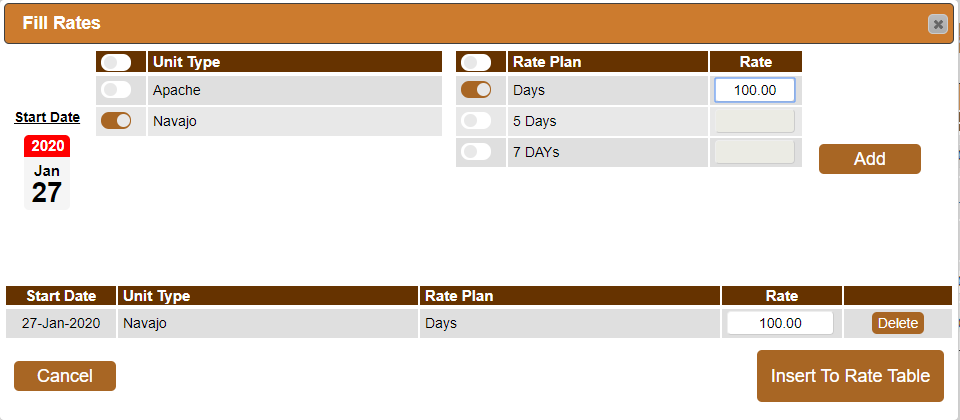
To Fill the rates:
1) Select the applicable Unit Type(s), Rate Plan(s) and the Start Date of the rate
2) Enter the appropriate rate in the rate field and click Add
3) Repeat (1) and (2) for any additional rates to be added
4) Click Insert to Rate Table once completed
• Add - This will allow a user to add another date column to allow a quick manual entry of a rate change of a rate plan that is not linked to RezExpert's rates